Assembly Language Machine Language Programs In Basic Computers
Category: COMPUTER SCIENCE | 30th October 2025, Thursday
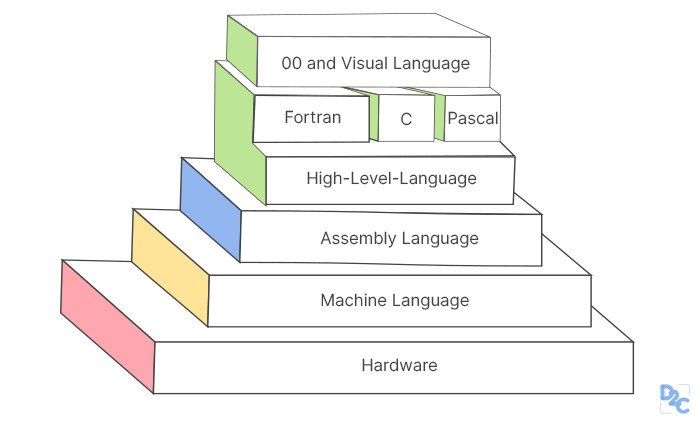
In The World Of Computer Systems, Languages Serve As The Bridge Between Human Thought And Machine Execution. Computers, Being Electronic Devices, Understand Only Binary Instructions — Combinations Of 0s And 1s Known As machine Language. However, Since Binary Codes Are Extremely Difficult For Humans To Read Or Write, More User-friendly Symbolic Languages, Such As assembly Language, Were Developed.
Both Machine And Assembly Languages Are Classified As low-level Programming Languages Because They Closely Interact With Hardware And System Architecture. Understanding These Two Languages, Along With How Programs Execute In A basic Computer, Is Essential To Grasp The Fundamentals Of Computer Organization And Programming.
1. Machine Language: The Language Of The Computer
Machine Language Is The Most Fundamental Form Of Computer Instruction. It Is The Set Of Binary Codes That A Computer’s Central Processing Unit (CPU) Can Directly Interpret And Execute Without Translation. Each Instruction Is Composed Of A Sequence Of Bits (binary Digits) That Specify Both The operation to Be Performed And The data Or address involved.
For Instance, In A Simple Computer, A 16-bit Instruction Might Be Divided Into:
- Opcode (Operation Code): 4 Bits – Defines The Operation, Such As ADD, LOAD, Or STORE.
- Operand (Address Or Data): 12 Bits – Specifies The Memory Location Or Register Involved.
An Example Binary Instruction Might Look Like:
0001 0010 0000 1111
Characteristics Of Machine Language
- Binary Representation – All Instructions And Data Are Expressed In 0s And 1s.
- Hardware-Dependent – Each CPU Has Its Own Unique Instruction Set Architecture (ISA).
- Difficult To Learn And Debug – Understanding Long Binary Strings Is Challenging For Humans.
- Fastest Execution – Since The CPU Directly Executes Machine Code, There Is No Need For Translation.
Advantages
- Executes Directly On The CPU Without Any Translation Or Interpretation.
- Maximum Efficiency In Speed And Performance.
Disadvantages
- Extremely Tedious And Error-prone To Program.
- Lacks Readability And Portability; Machine Code For One Computer May Not Work On Another.
- Difficult To Modify Or Debug Due To Binary Nature.
Despite These Limitations, All Higher-level Languages Eventually Translate Their Code Into Machine Language Before Execution, As This Is The Only Language The Hardware Understands.
2. Assembly Language: The Symbolic Representation
Assembly Language Is A Symbolic Representation Of Machine Language Instructions. Instead Of Writing Binary Codes, Programmers Use mnemonics (symbolic Names) For Operations And Labels For Memory Addresses, Making Programs More Understandable.
For Example:
LOAD 2000
ADD 2001
STORE 2002
The Above Assembly Code Performs The Same Operation That, In Machine Language, Would Require Several Binary Instructions. Each Mnemonic Corresponds Directly To A Machine-level Instruction, And Each Line Of Code Translates Into One Binary Instruction.
Key Components Of Assembly Language
- Mnemonics – Short Abbreviations For Operations (e.g., MOV, ADD, SUB, JMP).
- Operands – Represent Data, Registers, Or Memory Addresses (e.g., `A`, `B`, `2000`).
- Labels – Used To Mark Positions In Code For Branching Or Loops.
- Comments – Added Using Semicolons (;) To Describe Code Functionality.
Assembler
An assembler is A Special Software That Converts Assembly Language Into Machine Code. It Reads Symbolic Instructions And Translates Them Into The Corresponding Binary Equivalents That The CPU Can Execute. There Are Two Primary Types Of Assemblers:
- One-pass Assembler – Translates The Program In A Single Scan.
- Two-pass Assembler – Scans The Program Twice: First To Record Symbols And Addresses, Second To Generate Machine Code.
Advantages Of Assembly Language
- Easier To Write, Read, And Debug Than Machine Code.
- Direct Hardware Manipulation And Control.
- Efficient In Terms Of Memory And Speed.
- Allows Programmers To Optimize Programs For Specific Hardware.
Disadvantages
- Still Hardware-dependent And Non-portable.
- More Complex Than High-level Languages Like C Or Python.
- Development Time Is Longer Than Modern Programming Languages.
Assembly Language Remains Crucial In Systems Programming, Embedded Systems, Firmware Development, And Performance-critical Applications Where Direct Hardware Access Is Required.
3. Relationship Between Machine Language And Assembly Language
Machine Language And Assembly Language Are Closely Related — They Represent Two Levels Of The Same Code. The Main Difference Is readability and ease Of Use. Each Assembly Instruction Directly Corresponds To One Machine Instruction. This One-to-one Correspondence Ensures That Assembly Programs Can Be Translated Easily Into Machine Code.
| Aspect | Machine Language | Assembly Language |
| Format | Binary (0s And 1s) | Mnemonics (symbols) |
| Readability | Hard To Read | Easier To Understand |
| Translation | Directly Executed By CPU | Needs Assembler To Convert |
| Portability | Non-portable | Non-portable |
| Error Handling | Difficult | Easier With Symbolic Debugging Tools |
Thus, While Assembly Language Improves Programming Convenience, Both Remain Low-level And Hardware-specific.
4. Programs In Basic Computers
A basic Computer Is A Simplified Model Used To Illustrate How Instructions Are Executed In A CPU. It Consists Of Components Such As The Memory Unit, Processor Unit (CPU), Registers, Control Unit, And Input/Output (I/O) interfaces.
Programs Written For Basic Computers Are Typically Sequences Of Instructions Stored In Memory And Executed Sequentially Unless A branch or jump instruction Modifies The Flow.
Key Components In A Basic Computer
1. Memory Unit – Stores Data And Instructions.
2. Processor Registers – Temporary Storage Locations, Including:
AC (Accumulator) – Holds Intermediate Results.
PC (Program Counter) – Points To The Next Instruction.
IR (Instruction Register) – Holds The Current Instruction.
DR (Data Register) – Holds Data Fetched From Memory.
AR (Address Register) – Holds Memory Addresses.
3. Control Unit – Decodes Instructions And Directs Control Signals To Execute Them.
4. I/O System – Manages Input And Output Operations.
5. Writing And Executing A Program In A Basic Computer
Let’s Take A Simple Example Program That adds Two Numbers stored In Memory Locations 2000 And 2001 And Stores The Result In 2002.
Assembly Language Program
pgsql
ORG 100 ; Start Address
LDA 2000 ; Load Value From Memory 2000 into Accumulator
ADD 2001 ; Add Value From Memory 2001 to Accumulator
STA 2002 ; Store The Result from Accumulator into Memory 2002
HLT ; Stop Program Execution
END
Explanation
- ORG 100 – Sets The Starting Address Of The Program.
- LDA 2000 – Loads The Number At Memory Address 2000 Into The Accumulator.
- ADD 2001 – Adds The Number At Memory Address 2001 To The Accumulator.
- STA 2002 – Stores The Result From The Accumulator Into Memory Location 2002.
- HLT – Halts Program Execution.
Machine Language Equivalent
| Instruction | Opcode (in Binary) | Operand (Address) | Full Instruction (Binary) |
| LDA 2000 | 0001 | 0111 1101 0000 | 0001 0111 1101 0000 |
| ADD 2001 | 0010 | 0111 1101 0001 | 0010 0111 1101 0001 |
| STA 2002 | 0011 | 0111 1101 0010 | 0011 0111 1101 0010 |
| HLT | 0111 | 0000 0000 0000 | 0111 0000 0000 0000 |
The control Unit Fetches, Decodes, And Executes Each Instruction In Order, Completing The Operation Cycle Known As The fetch-decode-execute Cycle.
6. The Role Of Assemblers And Loaders
To Run An Assembly Program On A Basic Computer, The Following Steps Occur:
- Assembly – The Assembler Converts Symbolic Code Into Machine Code.
- Loading – The Loader Places The Binary Instructions Into Memory At The Specified Starting Address.
- Execution – The CPU Executes The Instructions Sequentially.
Modern Systems Use linkers and loaders to Combine Multiple Program Modules And Prepare Them For Execution.
7. Importance In Computer Architecture Education
Learning Assembly And Machine Languages Provides Insight Into:
- How CPUs Interpret Instructions.
- How Memory And Registers Interact.
- How Instruction Cycles, Addressing Modes, And Control Signals Function.
They Form The Foundation For Understanding Higher-level Programming And System Design, As Well As Advanced Topics Such As microprogramming, instruction Pipelining, And compiler Construction.
Conclusion
Machine Language And Assembly Language Form The Core Of Computer Programming At The Hardware Level. Machine Language Is Composed Of Binary Instructions That The CPU Executes Directly, While Assembly Language Uses Symbolic Representations To Make Programming More Human-readable.
In Basic Computers, Programs Follow A Simple Instruction Cycle — Fetch, Decode, And Execute — Using A Well-defined Architecture Of Memory, Registers, And Control Units. Understanding These Foundational Concepts Bridges The Gap Between Hardware Design And Software Execution, Enabling A Deeper Appreciation Of How Modern Computers Operate From The Ground Up.
Tags:
Assembly Language, Machine Language Programs In Basic Computers, Computer Architecture
