NFS (Network File System) In The Session Layer Of The OSI Model: A DetailsExplanation
Category: NETWORKING | 9th October 2026, Friday
Introduction To NFS
The Network File System (NFS) Is A Distributed File System Protocol That Allows Users And Applications To Access Files And Directories Stored On Remote Computers Over A Network. It Enables A Remote Directory To Appear As Part Of A Local File System, Allowing Users To Read, Write, Create, And Manage Files Without Physically Storing Those Files On Their Own Computers.
NFS Was Originally Developed By Sun Microsystems In The 1980s And Became Widely Used In UNIX And Linux Environments. It Is Now An Important Technology In Networked Computing, Distributed Systems, Enterprise Storage, Cloud Infrastructure, And High-performance Computing.
In The Context Of The Open Systems Interconnection (OSI) Model, NFS Is Sometimes Discussed Alongside The Session Layer Because It Establishes And Maintains Logical Interactions Between Client Applications And Remote File Servers. However, NFS Is Not A Protocol Of The OSI Session Layer (Layer 5). NFS Is An Application-layer Protocol That Relies On Other Protocols And Services, Including Remote Procedure Call (RPC), External Data Representation (XDR), And Transport Protocols Such As TCP Or UDP, Depending On The Implementation And Version.
Understanding NFS At Postgraduate Level Requires Examining Its Architecture, Protocol Stack, File-sharing Mechanisms, Session-like Interactions, Security, Performance, And Applications In Distributed Computing.
What Is Network File System (NFS)?
Network File System Is A Client-server Protocol That Provides Remote File Access Over A Network. It Allows A Client Computer To Access Files Located On A Remote Server Through A Mounted Directory.
For Example, Consider A University With A Central Linux Server That Stores Research Papers, Datasets, Software, And Student Project Files. Researchers Working On Different Computers Can Mount A Shared Directory From The Server And Access The Files As If They Were Stored Locally.
The Client Does Not Need To Manually Download Every File Before Using It. Instead, File Operations Are Translated Into Network Requests That The NFS Server Processes.
The Main Objectives Of NFS Include:
-
Sharing Files And Directories Across Networked Computers.
-
Providing Transparent Access To Remote Files.
-
Supporting Centralized Storage And Administration.
-
Enabling Collaboration Among Distributed Users.
-
Reducing Unnecessary Duplication Of Data.
-
Integrating Remote Storage With The Local File-system Namespace.
NFS Is Particularly Useful In Environments Where Many Computers Need Access To A Common Set Of Files.
NFS And The OSI Session Layer
The OSI Reference Model Contains Seven Layers, Each Responsible For A Different Aspect Of Communication.
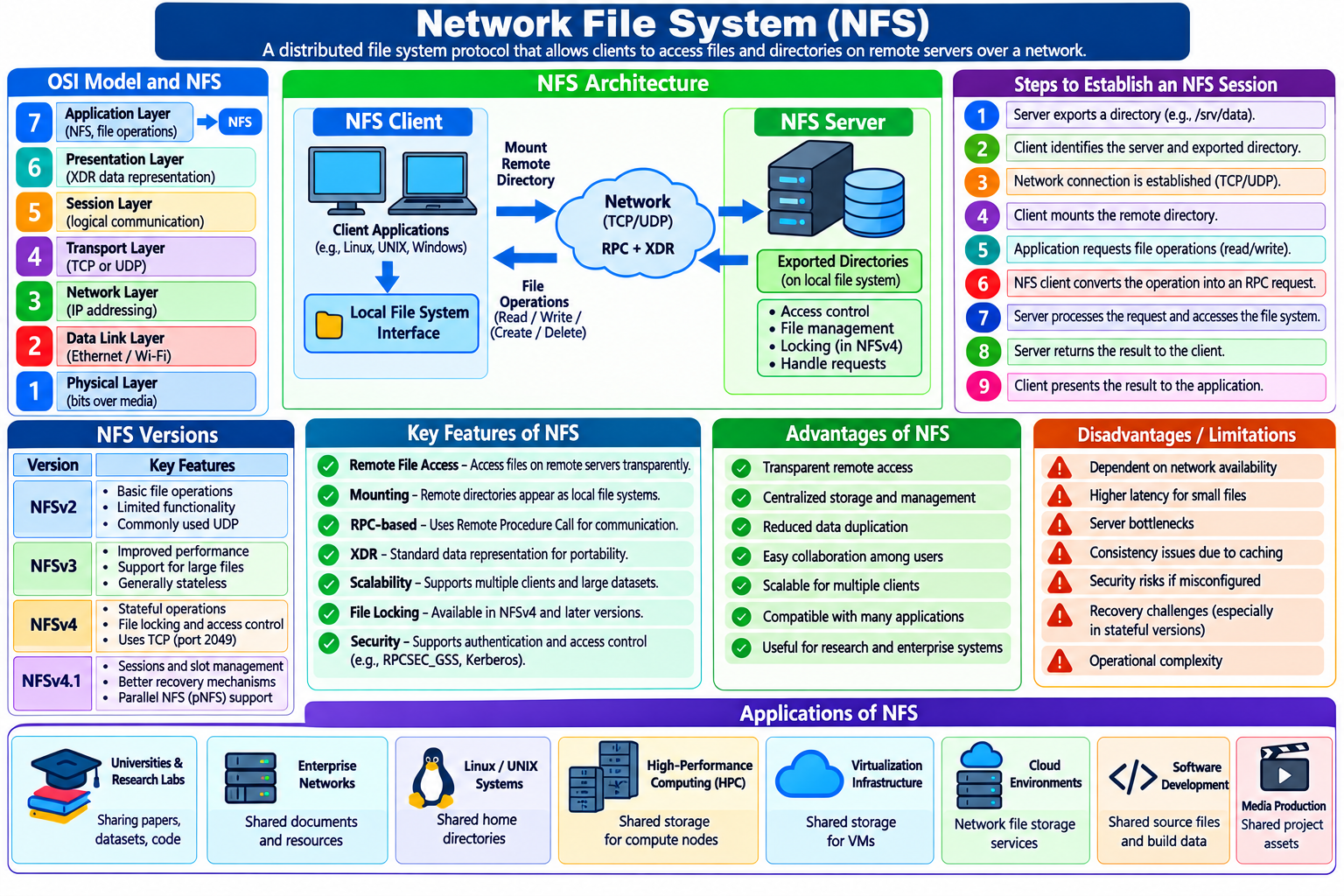
OSI Model And NFS Protocol Placement
7 Application Layer
NFS, File Operations, Client Applications
NFS
6 Presentation Layer
Data Representation; XDR Supports Structured RPC Data
5 Session Layer
Conceptual Dialogue Coordination And Communication Continuity
4 Transport Layer
TCP Or, In Some Configurations, UDP
3 Network Layer
IP Addressing And Packet Routing
2 Data Link Layer
Ethernet Or Wi-Fi Frames
1 Physical Layer
Electrical, Optical, Or Radio Signals
NFS Operates At The Application Level. Its RPC Interactions Provide Request-response Coordination, While The OSI Session Layer Offers A Conceptual Framework For Understanding Communication Sessions.
The Session Layer Traditionally Describes Functions Such As Establishing, Maintaining, Synchronizing, And Terminating Logical Communication Sessions. NFS Interactions Share Some Conceptual Similarities With These Functions Because Clients Repeatedly Communicate With Remote Servers To Perform File Operations.
However, These Similarities Do Not Make NFS A Layer 5 Protocol. NFS Is Generally Classified As An Application-layer Protocol, While RPC Provides The Mechanism Through Which Many NFS Operations Are Invoked Remotely.
Furthermore, NFS Versions Differ In How They Manage State. NFSv3 Is Largely Stateless At The Core Protocol Level, Whereas NFSv4 Introduces Stateful Features, Including Open And Lock State. These Differences Are Important When Comparing NFS With Session-management Concepts.
Architecture Of NFS
NFS Follows A Client-server Architecture. The Client Requests Access To Remote Files, While The Server Manages The Shared File System And Responds To Requests.
The Main Components Are:
NFS Client: A Computer Or Application That Accesses Remote Files Through NFS.
NFS Server: A Computer That Exports Directories And Processes Client Requests.
Remote Procedure Call (RPC): A Mechanism Through Which The Client Invokes Operations On The Server.
External Data Representation (XDR): A Standard Representation Used To Encode Structured Data Exchanged Through RPC.
Local File-system Interface: The Interface Through Which Applications Access Mounted Remote Directories.
Transport And Network Services: Protocols That Carry Requests And Responses Between Client And Server.
The NFS Client Translates File Operations Into Protocol Requests. The Server Interprets These Requests, Performs The Appropriate File-system Operations, And Returns Results.
This Architecture Separates The Application Requesting A File From The Physical Location Of The File.
Working Principle Of NFS
NFS Allows A Remote File System To Be Mounted On A Client Computer. Once Mounted, The Client Can Access The Shared Directory Through An Ordinary Path.
A Simplified Working Process Is As Follows:
-
The Server Configures A Directory For Network Sharing.
-
The Client Identifies The Server And Exported Directory.
-
The Client Establishes The Required Network Communication.
-
The Client Mounts The Remote Directory.
-
An Application Requests A File Operation.
-
The NFS Client Converts The Operation Into A Protocol Request.
-
The Server Processes The Request And Accesses Its Local Storage.
-
The Server Returns The Result To The Client.
-
The Client Presents The Result To The Application.
NFS Client
Application Requests A File
NFS + RPC
Encode Request And Coordinate The Remote Operation
Network Transport
TCP Or Another Supported Transport
NFS Server
Validate Request, Access File System, Return Response
For Example, When A User Opens /mnt/research/paper.pdf, The Operating System Checks Whether That Path Belongs To A Mounted NFS File System. If It Does, The Necessary Remote Operations Are Sent To The NFS Server.
The Exact Number Of Network Requests Depends On Caching, File-system Metadata, The NFS Version, And The Operation Being Performed.
Role Of RPC In NFS
Remote Procedure Call (RPC) Is A Key Technology Used By NFS. It Allows A Program On One Computer To Request A Procedure To Be Executed On Another Computer Through A Defined Protocol.
Without RPC, The Client Would Need To Implement The Low-level Network Communication Required For Every Remote File Operation.
With RPC, NFS Operations Can Be Expressed As Requests Such As Retrieving File Attributes, Reading Data, Writing Data, Or Creating A Directory.
A Simplified Example Is:
Client Application
       |
       V
NFS Client
       |
       V
RPC Request: READ(file Handle, Offset, Length)
       |
       V
NFS Server
       |
       V
Read Data From Storage
       |
       V
RPC Response: File Data
       |
       V
Client Application
This Request-response Mechanism Provides A Useful Conceptual Connection To Session-based Communication. However, RPC Is Not Itself Equivalent To The OSI Session Layer, And Its Use Does Not Imply That A Permanent Application Dialogue Must Exist.
RPC Can Operate Over Different Transports. NFS Implementations Commonly Use TCP, While Older Or Specially Configured Deployments May Use UDP.
NFS Versions: NFSv2, NFSv3, NFSv4, And NFSv4.1
NFS Has Evolved Significantly To Improve Performance, Functionality, Security, And Operation Across Different Network Environments.
NFSv2
NFSv2 Was An Early Widely Deployed Version. It Supported Basic Remote File Operations, Including Reading, Writing, And Accessing File Attributes. It Commonly Used UDP In Traditional Deployments And Had Limitations In File Size And Protocol Capabilities Compared With Later Versions.
NFSv3
NFSv3 Introduced Improvements Such As Support For Larger Files, Enhanced Performance, And More Flexible Error Reporting. It Is Generally Stateless At The Core NFS Protocol Level, Meaning The Server Does Not Maintain The Same Open-file And Locking State That Is Central To NFSv4.
Supporting Services, Such As Network Locking, May Nevertheless Maintain Their Own State.
NFSv4
NFSv4 Introduced A More Integrated Protocol Design, Including Stronger Support For Stateful Operations, File Locking, Access Control, And Operation Sequences. It Also Improved Deployment Through A More Consolidated Use Of The Network Port Commonly Associated With NFS, TCP Port 2049.
NFSv4 Uses State Identifiers And Lease Mechanisms To Manage Certain Client-server Relationships.
NFSv4.1
NFSv4.1 Added Features Such As Sessions In The Specific NFS Protocol Sense, Improved Recovery Mechanisms, And Support For Parallel NFS (pNFS). In NFSv4.1, Protocol Sessions Provide Mechanisms For Organizing And Tracking Requests Between A Client And Server, Including Session Identifiers And Slot-based Request Management.
This Is A Particularly Important Distinction For The Topic Of The Session Layer: NFSv4.1 Explicitly Defines Protocol Sessions, But NFS Remains An Application-layer Protocol Rather Than A Standardized OSI Layer 5 Protocol.
Stateful And Stateless Communication In NFS
One Of The Most Important Technical Distinctions Among NFS Versions Is How They Manage State.
In A Stateless Design, The Server Can Process Many Operations Without Maintaining Persistent Open-file State For Each Client Operation. Requests Contain The Information Needed To Identify The File And Perform The Requested Action.
For Example, An NFSv3 Read Request Typically Identifies The File Using A File Handle, Together With An Offset And The Number Of Bytes To Read.
In A Stateful Design, The Server Tracks Additional Information About Clients And Their Interactions. NFSv4 Uses State Associated With Operations Such As Opening Files And Acquiring Locks.
Stateful Operation Can Improve Coordination, But It Also Introduces Recovery Challenges. If A Client Or Server Restarts, The System May Need To Recover Or Reclaim Relevant State.
NFSv4 Uses Leases And Recovery Procedures To Help Manage These Situations.
Stateful And Stateless Designs Are Both Useful, Depending On The Requirements Of The Distributed File System.
File Handles And Remote File Access
An NFS File Handle Is An Opaque Identifier That The Client Uses To Refer To A File Or Directory On The Server. It Allows The Server To Identify The Relevant File-system Object Without Requiring The Client To Transmit A Full Local Path For Every Operation.
A Typical File Operation May Involve A File Handle, An Offset, A Data Length, And Operation-specific Parameters.
For Example:
Operation: READ
File Handle: Server-issued Identifier
Offset: 0
Length: 4096 Bytes
This Request Asks The Server To Return Up To 4,096 Bytes Beginning At Offset Zero, Subject To The File's Size And The Protocol's Rules.
The Server Uses The File Handle To Identify The Object And Perform The Operation. The Client Receives The Data And Makes It Available Through Its Local File-system Interface.
File Handles Support Transparent Access To Remote Objects, But They Should Be Treated As Protocol-level Identifiers Rather Than Human-readable File Paths.
Mounting And Exporting NFS Directories
NFS Sharing Generally Requires Two Main Operations: Exporting A Directory On The Server And Mounting It On The Client.
An Exported Directory Is A Server-side Directory Made Available To Permitted Clients. A Mount Associates That Remote Directory With A Location In The Client's File-system Namespace.
For Example, On A Linux NFS Server, An Administrator Might Configure A Directory In /etc/exports:
/srv/research 192.168.1.0/24(ro,sync)This Illustrative Configuration Exports /srv/research To The Specified Network Range With Read-only Access And Synchronous Write Handling. The Actual Security And Operational Suitability Depend On The Environment And Server Configuration.
On A Linux Client, An Administrator Might Mount The Exported Directory Using:
Bash
sudo Mount -t Nfs Server.example.com:/srv/research /mnt/researchAfter Mounting, Applications Can Access The Remote Files Through /mnt/research.
These Commands Are Examples For Linux Systems; The Exact Configuration May Differ By Distribution, NFS Version, And Security Requirements.
NFS Synchronization And File Consistency
File Consistency Is A Major Issue In Distributed File Systems. Multiple Clients May Access Or Modify The Same Remote File, So The System Must Manage Cached Data And Concurrent Operations.
NFS Uses Caching To Improve Performance. Clients May Cache File Data And Metadata So That Repeated Operations Do Not Always Require Network Communication.
However, Caching Introduces The Possibility That One Client May Temporarily Observe Information Different From What Another Client Has Recently Written.
NFS Consistency Behavior Depends On The Protocol Version, Client Implementation, Server Implementation, And Mount Options.
Important Mechanisms Include:
-
Attribute Caching And Cache Validation.
-
File Locking Where Supported And Correctly Configured.
-
Write And Commit Operations.
-
Protocol-specific State Management.
-
Application-level Coordination When Strict Consistency Is Required.
For Example, Two Researchers Editing The Same Document Simultaneously May Overwrite Each Other's Changes If Their Applications Do Not Coordinate Updates. NFS Provides File-access Mechanisms, But It Does Not Automatically Make Every Application-level Editing Workflow Conflict-free.
Applications That Require Stronger Coordination Should Use Suitable Locking And Transactional Mechanisms Or Design Their Data-sharing Workflow To Avoid Conflicting Writes.
Security In NFS
Security Is A Critical Consideration Because NFS Exposes Remote File Operations Over A Network.
Traditional NFS Deployments May Use Client Identity And Host-based Access Controls, While Newer Configurations Can Support Stronger Authentication And Protection Mechanisms.
Relevant Security Concerns Include Unauthorized Access, Spoofed Client Identities, Interception Of Network Traffic, And Improper Export Permissions.
Security Mechanisms Vary By NFS Version And Configuration. For Example, RPCSEC_GSS Can Provide RPC-level Security Services, Including Authentication And, When Appropriately Configured, Integrity Or Privacy Protection. Kerberos-based Mechanisms Are Commonly Associated With These Deployments.
Recommended Practices Include:
-
Restrict Exports To Trusted Clients And Required Networks.
-
Apply Least-privilege File And Directory Permissions.
-
Use Appropriate RPCSEC_GSS Or Kerberos Security Configurations When Needed.
-
Protect NFS Traffic Using Supported Security Mechanisms.
-
Avoid Exposing NFS Services Directly To Untrusted Networks.
-
Monitor Server Logs And Access Patterns.
-
Keep Server And Client Software Updated.
-
Use Firewalls And Network Segmentation To Limit Exposure.
NFS Security Should Be Designed Around The Threat Model, The Sensitivity Of Stored Data, And The Capabilities Of The Selected Implementation.
Advantages Of NFS
NFS Offers Several Advantages In Distributed Computing.
Transparent Remote Access: Users Can Work With Remote Files Through Familiar File-system Paths.
Centralized Storage: Administrators Can Maintain Shared Data On A Central Server.
Reduced Duplication: Multiple Clients Can Access Common Files Without Maintaining Separate Copies.
Simplified Administration: Backup, Storage Allocation, And Access Management Can Be Centralized.
Scalability: NFS Can Serve Multiple Clients, With Capacity Depending On Server Resources And Workload.
Application Compatibility: Many Applications Can Access NFS-mounted Files Without Requiring Special File-transfer Code.
Research Collaboration: Shared Datasets And Project Directories Can Support Collaborative Work In Laboratories And Universities.
These Advantages Make NFS Valuable For Networked Workstations, Enterprise Systems, And Shared Computing Environments.
Disadvantages And Limitations Of NFS
Despite Its Advantages, NFS Has Limitations.
Network Dependency: Access To Remote Files May Become Slow Or Unavailable If The Network Or Server Fails.
Latency: Small File Operations May Incur Significant Delays Over High-latency Networks.
Server Bottlenecks: A Heavily Loaded Server Can Limit Performance For All Connected Clients.
Consistency Complexity: Concurrent File Modifications And Caching Can Produce Application-level Problems.
Security Configuration: Incorrect Export Rules Or Weak Authentication Can Expose Sensitive Data.
Recovery Challenges: Stateful Versions Require Suitable Recovery Procedures After Certain Client Or Server Failures.
Operational Complexity: Enterprise Deployments May Require Careful Monitoring, Tuning, Redundancy, And Capacity Planning.
These Limitations Should Be Considered When Deciding Whether NFS Is Appropriate For A Particular Application.
Applications Of NFS
NFS Is Used In Many Computing Environments.
-
Universities And Research Laboratories: Sharing Research Papers, Source Code, And Scientific Datasets.
-
Enterprise Networks: Providing Centralized Access To Shared Documents And Departmental Files.
-
Linux And UNIX Servers: Sharing Home Directories And Application Data.
-
High-performance Computing: Providing Shared Access To Data Required By Compute Nodes.
-
Virtualization Infrastructure: Supporting Certain Shared-storage Configurations.
-
Cloud Environments: Providing Network-accessible File Storage Through Compatible Managed Services.
-
Software Development: Sharing Source Files, Build Inputs, And Common Resources Among Systems.
-
Media Production: Allowing Multiple Authorized Workstations To Access Shared Project Assets.
Performance And Suitability Depend On The Workload, Network Characteristics, Server Capacity, And NFS Implementation.
NFS Compared With SMB
NFS And Server Message Block (SMB) Are Both Protocols Used For Network File Sharing, But They Have Different Histories And Implementation Characteristics.
| Feature | NFS | SMB |
|---|---|---|
| Common Environments | Linux, UNIX, And Compatible Systems | Windows, Linux, MacOS, And Compatible Systems |
| Primary Purpose | Remote File-system Access | File, Printer, And Related Resource Sharing |
| Protocol Classification | Application Layer | Application Layer |
| Transport | Commonly TCP; Older Or Selected Configurations May Use UDP | Commonly TCP |
| State Management | Varies By NFS Version | Stateful Protocol With File And Session Mechanisms |
| Authentication | Depends On Version And Configuration | Supports Mechanisms Including Kerberos And NTLM In Applicable Environments |
| Common Applications | Linux Shared Storage And UNIX-oriented Infrastructure | Windows File Servers And Cross-platform File Sharing |
Neither Protocol Is Universally Superior. The Appropriate Choice Depends On Client Compatibility, Security Requirements, Administrative Tooling, Performance Characteristics, And Application Needs.
Relationship Between NFS And Session Management
NFS Provides A Useful Case Study For Understanding How Session-like Concepts Appear In Application Protocols.
In A Broad Conceptual Sense, A Client Communicates With A Server, Issues Requests, Receives Responses, And May Maintain State Across Multiple Operations. These Behaviors Resemble Aspects Of Session Management In The OSI Reference Model.
However, The Implementation Details Matter:
-
NFSv3 Is Largely Stateless At The Core File-operation Level.
-
NFSv4 Introduces Stateful File Access And Locking Features.
-
NFSv4.1 Defines Explicit Protocol Sessions With Mechanisms For Request Management And Recovery.
-
RPC Coordinates Remote Procedure Invocations.
-
TCP Provides Reliable Transport When Used, But It Does Not Itself Implement All NFS Session Semantics.
Therefore, The Relationship Between NFS And The Session Layer Is Best Understood As A Conceptual Comparison, Not As A Direct Protocol-layer Assignment.
Conclusion
Network File System Is A Major Application-layer Protocol For Distributed File Access. It Allows Client Computers To Use Remote Files And Directories Through A Familiar File-system Interface While The Server Manages The Underlying Storage Operations.
Its Architecture Relies On RPC, Data Representation Mechanisms, And Transport Protocols To Carry Requests And Responses. Its Capabilities Include File Sharing, Centralized Administration, Remote Access, And Support For Collaborative Computing.
From The Perspective Of The OSI Session Layer, NFS Illustrates How Applications Can Maintain Logical Communication Contexts And Coordinate Repeated Operations. NFSv4.1 Is Particularly Relevant Because It Explicitly Defines Protocol Sessions, Although The Protocol Remains At The Application Layer.
For Postgraduate Students, Understanding NFS Requires Distinguishing The OSI Session Layer From Database- Or Application-specific Sessions, RPC Interactions, Transport Connections, And File-system State. This Distinction Provides A Solid Foundation For Advanced Study In Computer Networks, Distributed Systems, Network Security, And Cloud Storage.
Tags:
NFS, Network File System, Working Principle Of NFS, Architecture Of NFS
