What Is JPEG (Joint Photographic Experts Group)? – Definition, Working, Compression, Features, Advantages, Disadvantages, And Applications
Category: NETWORKING | 13th November 2026, Friday
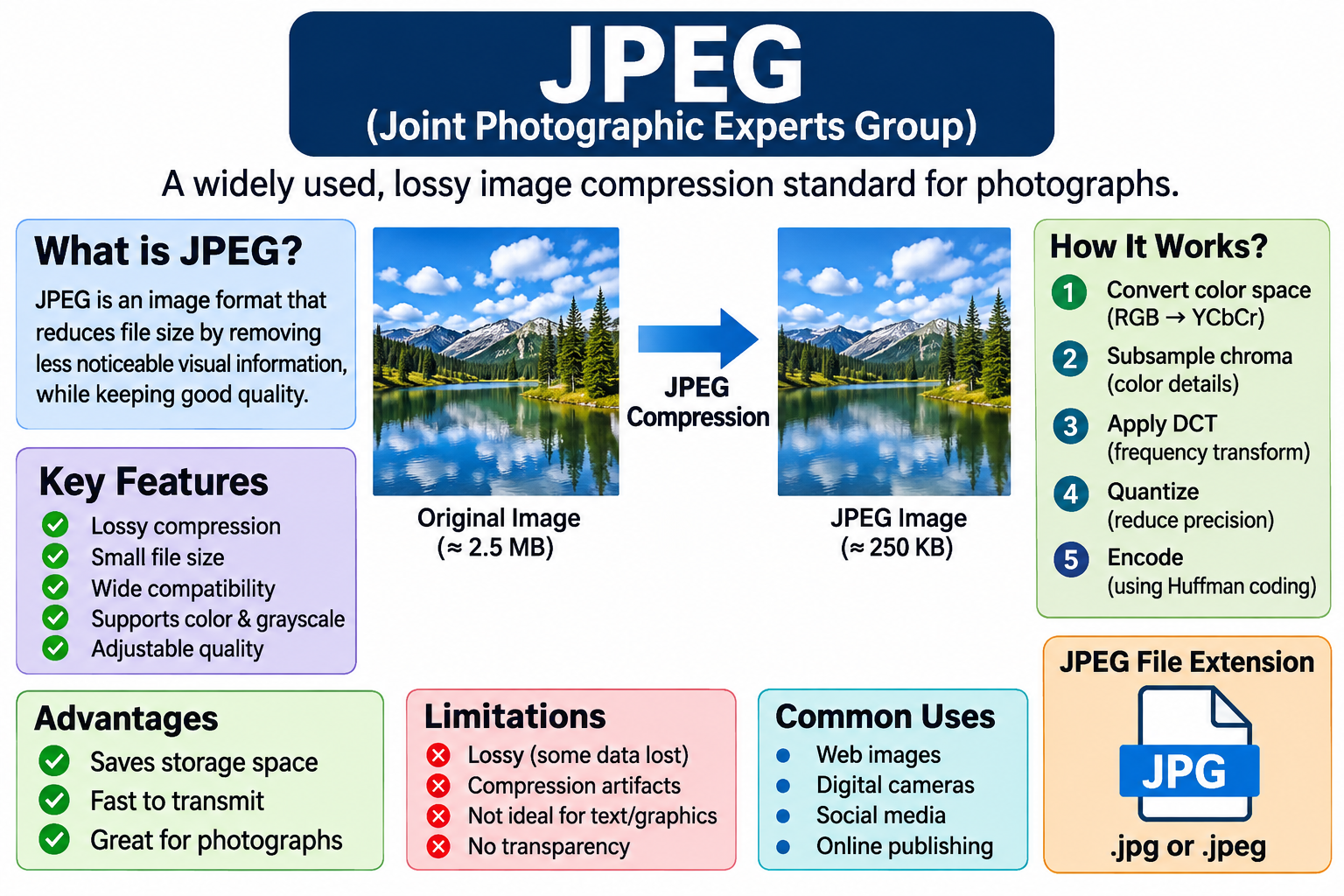
Introduction To JPEG
JPEG Stands For Joint Photographic Experts Group. It Is One Of The Most Widely Used Digital Image Compression Standards For Storing, Transmitting, And Displaying Photographic Images. JPEG Was Developed By A Committee Known As The Joint Photographic Experts Group, Which Was Formed Through Collaboration Between The International Organization For Standardization (ISO) And The International Telecommunication Union (ITU). The JPEG Standard Was Introduced In 1992 To Provide An Efficient Method Of Compressing Digital Images While Maintaining Acceptable Visual Quality.
It Is Particularly Suitable For Photographs, Natural Images, Colorful Pictures, And Complex Visual Scenes Containing Millions Of Pixels. JPEG Reduces The Amount Of Storage Space Required By Digital Images And Makes It Easier To Transfer Images Over Computer Networks, Websites, Email Services, And Other Digital Communication Platforms. Today, JPEG Is Supported By Almost All Computers, Smartphones, Digital Cameras, Web Browsers, Image Editing Applications, And Operating Systems.
Definition Of JPEG
JPEG Is A Lossy Image Compression Standard That Reduces The File Size Of Digital Images By Removing Visual Information That Is Less Noticeable To The Human Visual System. It Uses Mathematical And Perceptual Techniques To Represent Image Information More Efficiently.
Unlike Uncompressed Image Formats, Which Store Pixel Information Directly, JPEG Transforms Image Data Into Frequency Components And Applies Quantization To Reduce The Amount Of Information Required For Storage. The Compression Process Attempts To Maintain The Visual Appearance Of The Original Image While Significantly Reducing Its File Size.
JPEG Is Commonly Associated With The .jpg And .jpeg File Extensions. Both Extensions Represent The Same Basic Image Format And Have No Significant Difference In Image Quality Or Compression Capabilities. JPEG Is Especially Useful For Photographs Because It Can Achieve Substantial Compression While Preserving Many Important Visual Details.
History And Development Of JPEG
The Development Of JPEG Began In The 1980s When Digital Imaging And Computer-based Multimedia Applications Started Becoming Increasingly Important. At That Time, Storing And Transmitting High-resolution Images Required Large Amounts Of Storage Capacity And Network Bandwidth.
The Joint Photographic Experts Group Was Established To Develop An International Standard For Compressing Continuous-tone Still Images. The Committee Included Experts From Different Technical Organizations Who Worked Together To Create A Standardized Compression Technique. In 1992, The JPEG Standard Was Published As An International Image Compression Standard. Its Initial Specification Was Designed To Support Both Grayscale And Color Images With Different Levels Of Compression.
The Development Of JPEG Played A Significant Role In The Expansion Of Digital Photography, Internet Publishing, Multimedia Communication, And Image Processing Technologies. Over Time, Additional JPEG-related Standards And Extensions Were Developed, Including JPEG 2000, JPEG-LS, JPEG XR, And JPEG XT, To Support Different Image Compression Requirements.
Basic Characteristics Of JPEG
JPEG Has Several Important Characteristics That Make It Suitable For Digital Image Storage And Transmission. Its Most Important Characteristic Is Lossy Compression, Which Allows Image Files To Become Significantly Smaller Than Their Original Uncompressed Versions. JPEG Supports Grayscale Images And Color Images, Commonly Using 8-bit Samples For Each Component In Conventional Implementations.
Standard JPEG Commonly Supports Image Dimensions Suitable For Photographs, Although Practical Limits Depend On The Specific JPEG Process And Implementation. It Also Supports Different Compression Levels, Allowing Users To Select A Balance Between Image Quality And File Size. Another Important Characteristic Is Its Widespread Compatibility With Hardware And Software Platforms.
JPEG Images Can Be Opened Using Web Browsers, Image Viewers, Photo Editing Programs, Mobile Applications, And Digital Cameras. JPEG Also Supports Progressive Encoding, Which Allows An Image To Be Displayed Gradually As More Image Data Becomes Available.
Working Principle Of JPEG Compression
JPEG Compression Works Through A Sequence Of Mathematical Operations That Convert An Image Into A More Compact Representation. The Process Generally Involves Color Space Conversion, Chroma Subsampling, Image Block Division, Discrete Cosine Transform (DCT), Quantization, Coefficient Ordering, And Entropy Encoding. First, The Original RGB Image Is Commonly Converted Into The YCbCr Color Space. The Image May Then Undergo Chroma Subsampling To Reduce The Amount Of Color Information.
Next, The Image Is Divided Into Small Blocks, Usually Containing 8 × 8 Pixels. Each Block Is Transformed Using The Discrete Cosine Transform, Which Converts Spatial Pixel Information Into Frequency Components. The Resulting Coefficients Are Quantized To Reduce Precision And Remove Less Visually Important Information. Finally, The Coefficients Are Arranged And Encoded Using Techniques Such As Run-length Coding And Huffman Coding. The Resulting Compressed Data Is Stored In A JPEG File.
Color Space Conversion In JPEG
Color Space Conversion Is An Important Stage In JPEG Compression. Most Digital Images Are Initially Represented Using The RGB Color Model, In Which Every Pixel Contains Red, Green, And Blue Color Components. However, JPEG Commonly Converts RGB Information Into The YCbCr Color Space Because This Representation Separates Brightness Information From Color Information.
Y Represents Luminance, Which Describes The Brightness Of An Image, While Cb And Cr Represent Chrominance Information Associated With Blue-difference And Red-difference Color Components. Human Vision Is Generally More Sensitive To Changes In Brightness Than To Small Changes In Color Information.
By Separating Luminance And Chrominance, JPEG Can Compress Color Information More Aggressively While Maintaining Acceptable Visual Quality. This Conversion Improves Compression Efficiency And Is Particularly Effective For Natural Photographs Containing Many Different Colors And Brightness Levels.
Chroma Subsampling In JPEG
Chroma Subsampling Is A Technique Used In JPEG Compression To Reduce The Amount Of Color Information Stored In An Image. It Takes Advantage Of The Human Visual System's Greater Sensitivity To Luminance Than Chrominance. In This Process, The Brightness Component Is Generally Preserved At A Higher Resolution, While Color Components Are Stored At Lower Spatial Resolutions. Common Chroma Subsampling Formats Include 4:4:4, 4:2:2, And 4:2:0. In 4:4:4 Sampling, All Color Components Retain The Same Horizontal Sampling Resolution.
In 4:2:2 Sampling, Chrominance Information Is Reduced Horizontally By Approximately Half. In 4:2:0 Sampling, Chrominance Information Is Reduced Both Horizontally And Vertically. The 4:2:0 Format Is Widely Used In Photographic JPEG Images Because It Provides Effective Compression With Relatively Little Visible Color Degradation In Many Photographs. However, Aggressive Chroma Subsampling Can Reduce The Sharpness Of Colored Text, Fine Graphics, And Sharp Color Boundaries.
Image Block Division And Discrete Cosine Transform
After Color Conversion And Optional Chroma Subsampling, JPEG Divides Image Components Into Small Blocks, Generally Containing 8 × 8 Samples. Each Block Contains 64 Values Representing Pixel Brightness Or Color Information.
The Discrete Cosine Transform Is Then Applied To Convert These Spatial-domain Values Into Frequency-domain Coefficients. The DCT Identifies How Image Intensity Changes Across Different Spatial Frequencies. Low-frequency Coefficients Represent Gradual Changes In Brightness And Large Visual Structures, While High-frequency Coefficients Represent Rapid Changes Such As Edges, Fine Details, And Small Variations.
The First Coefficient, Known As The DC Coefficient, Represents The Average Value Of The Block. The Remaining 63 Coefficients Are AC Coefficients That Describe Different Frequency Patterns. This Transformation Helps JPEG Identify Information That Can Be Represented With Reduced Precision Without Producing Significant Visible Changes In The Image.
Quantization Process In JPEG
Quantization Is One Of The Most Important Stages Of JPEG Compression Because It Is Primarily Responsible For Reducing Image File Size Through Lossy Data Reduction. After The DCT Operation, JPEG Divides The Frequency Coefficients By Corresponding Values In A Quantization Table And Rounds The Results To Integer Values.
Low-frequency Coefficients Are Generally Quantized Less Aggressively Because They Contain Important Visual Information. High-frequency Coefficients Are Usually Quantized More Aggressively Because Small Changes In These Components Are Often Less Noticeable To Human Observers. The Quantization Table Determines How Much Information Is Removed During Compression.
A Higher Quantization Strength Generally Produces Smaller Files But Reduces Image Quality. A Lower Quantization Strength Preserves More Image Details But Creates Larger Files. Quantization Is Irreversible Because The Original Coefficient Values Cannot Be Reconstructed Exactly After Rounding. Therefore, JPEG Compression Is Classified As A Lossy Compression Technique.
Zigzag Scanning And Entropy Encoding
After Quantization, JPEG Organizes The 64 Coefficients Of Each 8 × 8 Block Using A Zigzag Scanning Pattern. This Scanning Process Begins With The Low-frequency Coefficients And Gradually Moves Toward The High-frequency Coefficients.
The Purpose Is To Group Important Low-frequency Information Near The Beginning While Placing Many Zero-valued High-frequency Coefficients Toward The End. This Arrangement Makes The Data Easier To Compress. JPEG Then Uses Entropy Encoding To Represent The Coefficients Efficiently. Run-length Encoding Is Used To Represent Consecutive Zero-valued Coefficients Without Storing Each Zero Individually.
Huffman Coding Is Commonly Used To Assign Shorter Binary Codes To Frequently Occurring Symbols And Longer Codes To Less Frequent Symbols. Some JPEG Processes Also Support Arithmetic Coding. These Techniques Reduce The Number Of Bits Required To Represent The Quantized Image Data Without Introducing Additional Loss During The Entropy Encoding Stage.
JPEG Decompression Process
JPEG Decompression Is The Reverse Process Of Converting Compressed JPEG Data Into A Displayable Image. When An Application Opens A JPEG File, It First Reads The File Structure And Extracts The Compressed Image Information. The Entropy Decoder Reconstructs The Quantized DCT Coefficients From The Encoded Data. The Coefficients Are Then Multiplied By The Corresponding Quantization Table Values To Obtain Approximate Frequency-domain Information. Next, The Inverse Discrete Cosine Transform (IDCT) Converts The Frequency Coefficients Back Into Spatial-domain Pixel Values.
The Image Components Are Reconstructed, And Chrominance Information Is Expanded When Chroma Subsampling Has Been Used. Finally, The YCbCr Color Representation Is Converted Back Into RGB Or Another Display-compatible Color Space. The Reconstructed Image Can Then Be Displayed On A Monitor, Smartphone, Or Other Digital Device. Because Quantization Removes Information Permanently, The Decompressed Image Is Generally Not Identical To The Original Image.
Different Types And Modes Of JPEG
JPEG Supports Different Encoding Processes And Operating Modes Designed For Various Image Compression Requirements. Baseline Sequential JPEG Is The Most Commonly Supported JPEG Process. It Compresses Image Data Using A Sequential Encoding Approach And Is Widely Compatible With Digital Cameras, Web Browsers, And Image Editing Applications. Progressive JPEG Encodes An Image In Multiple Scans, Allowing A Low-detail Version Of The Image To Appear Before The Complete Image Has Been Downloaded.
Sequential JPEG And Progressive JPEG Can Use Similar Underlying Compression Techniques But Differ In How Image Information Is Transmitted. Lossless JPEG Is Another Historical JPEG Process That Reconstructs Pixel Values Without Introducing Compression Loss. However, It Is Less Widely Used Than Conventional Lossy JPEG. Extended JPEG Processes Support Additional Features, Such As Different Sample Precision And Other Coding Options. These Modes Demonstrate The Flexibility Of JPEG Technology For Different Image Processing And Communication Applications.
JPEG File Structure
A JPEG File Contains Several Components That Describe The Compressed Image And Provide Information Required For Decoding. JPEG Files Commonly Use A Structure Consisting Of Markers, Segments, Image Data, And Termination Information. The Start Of Image (SOI) Marker Indicates The Beginning Of The JPEG File.
The Define Quantization Table (DQT) Marker Specifies Quantization Tables Used During Compression. The Define Huffman Table (DHT) Marker Provides Huffman Coding Information. The Start Of Frame (SOF) Marker Describes Image Properties Such As Dimensions, Component Information, And Coding Parameters.
The Start Of Scan (SOS) Marker Indicates The Beginning Of Compressed Image Data. Finally, The End Of Image (EOI) Marker Indicates The End Of The JPEG Image Stream. JPEG Files May Also Contain Metadata, Including Camera Information, Image Orientation, Date And Time, And Other Details Through Exchangeable Image File Format (EXIF) Information. This Structured Design Allows Different Software Applications To Interpret And Display JPEG Images.
Difference Between JPEG And Other Image Formats
JPEG Is One Of Several Digital Image Formats, And Each Format Has Different Characteristics And Applications. PNG (Portable Network Graphics) Uses Lossless Compression And Supports Transparency, Making It Suitable For Logos, Icons, Diagrams, And Screenshots. GIF (Graphics Interchange Format) Supports Animation And A Limited Color Palette, Making It Useful For Simple Animated Graphics. BMP (Bitmap) Traditionally Stores Pixel Information With Little Or No Compression, Resulting In Relatively Large File Sizes.
TIFF (Tagged Image File Format) Supports Various Compression Methods And Is Widely Used In Professional Imaging, Scanning, And Publishing Workflows. WebP Provides Both Lossy And Lossless Compression And Supports Transparency And Animation. AVIF Is A Modern Image Format Based On AV1 Technology That Can Provide High Compression Efficiency. Compared With These Formats, JPEG Remains Especially Popular For Photographs Because Of Its Extensive Compatibility And Efficient Lossy Compression.
Advantages Of JPEG
JPEG Offers Several Advantages That Make It One Of The Most Widely Used Image Formats. The First Major Advantage Is Its Ability To Significantly Reduce Image File Sizes. This Helps Save Storage Space On Computers, Smartphones, Memory Cards, And Cloud Storage Platforms. The Second Advantage Is Its Broad Compatibility. Almost All Modern Operating Systems, Web Browsers, Digital Cameras, And Image Editing Applications Support JPEG Files.
Another Advantage Is Its Adjustable Compression Level, Which Allows Users To Select The Desired Balance Between Image Quality And File Size. JPEG Is Particularly Effective For Photographs Containing Complex Colors, Gradients, Textures, And Natural Scenes. It Also Supports Progressive Encoding, Which Can Improve The Perceived Loading Experience On Websites. Furthermore, JPEG Images Are Convenient For Sharing Through Email, Social Media, Messaging Applications, And Online Publishing Platforms.
Disadvantages And Limitations Of JPEG
Despite Its Advantages, JPEG Has Several Disadvantages. Its Most Important Limitation Is Lossy Compression, Which Permanently Removes Image Information During Quantization. Repeatedly Opening And Saving An Edited JPEG Image Using Lossy Compression Can Introduce Additional Quality Degradation. JPEG Also Does Not Natively Support Transparency Or Multiple Animation Frames In The Conventional Still-image Format.
It Is Less Suitable For Images Containing Sharp Edges, Small Text, Line Drawings, And Diagrams Because Compression Artifacts Can Appear Around These Features. At High Compression Levels, JPEG Images May Exhibit Blocking Artifacts, Blurring, Ringing, And Color Distortion. Another Limitation Is That JPEG Does Not Provide The Same Editing Flexibility As Certain Professional Image Formats That Preserve Extensive Original Image Information. Therefore, Formats Such As PNG, TIFF, Or RAW May Be More Appropriate For Certain Professional Graphics And Photography Workflows.
JPEG Compression Artifacts And Image Quality
JPEG Compression Artifacts Are Unwanted Visual Distortions Introduced During The Compression And Decompression Process. One Common Artifact Is The Blocking Effect, Which Occurs When Boundaries Between Adjacent 8 × 8 Pixel Blocks Become Visible. This Problem Is More Noticeable When Images Are Compressed Aggressively. Another Artifact Is Ringing, Which Produces Unwanted Patterns Or Halos Around Sharp Edges.
Blurring Is Another Common Problem Because Quantization Reduces High-frequency Information Responsible For Fine Details. Color Bleeding May Also Occur When Chroma Subsampling Reduces Color Resolution Around Sharp Boundaries. JPEG Image Quality Depends On Several Factors, Including The Compression Quality Setting, Quantization Tables, Chroma Subsampling Method, Original Image Resolution, And Image Content.
A High-quality JPEG Generally Preserves More Visual Details, Whereas A Highly Compressed JPEG Occupies Less Storage Space But May Show Noticeable Distortions. Therefore, Selecting An Appropriate Compression Level Is Important When Saving Photographs.
Applications Of JPEG In Computer Networks And Digital Media
JPEG Has Numerous Applications In Computer Networks, Multimedia Systems, And Digital Communication Technologies. Websites Commonly Use JPEG Images To Display Photographs, Product Images, Banners, And Visual Content Because Smaller Image Files Can Reduce Bandwidth Consumption And Improve Page Loading Performance.
Digital Cameras And Smartphones Frequently Use JPEG As A Standard Output Format For Photographs. Social Media Platforms Use JPEG Or Other Image Formats To Store, Process, And Distribute Photographic Content. Email Applications Use JPEG Attachments To Share Images Efficiently. In Computer Vision And Image Processing, JPEG Images Are Used As Input Data For Classification, Object Detection, Face Recognition, And Other Machine Learning Applications.
JPEG Is Also Useful In Digital Libraries, Educational Platforms, Online Newspapers, E-commerce Systems, And Multimedia Databases. Its Widespread Support Makes It An Important Component Of Modern Digital Information Systems.
JPEG In Image Processing, Artificial Intelligence, And Cybersecurity
JPEG Plays An Important Role In Image Processing, Artificial Intelligence, And Digital Forensics. In Image Processing, JPEG Images Can Be Used For Resizing, Filtering, Enhancement, Segmentation, Restoration, And Feature Extraction. Machine Learning And Deep Learning Systems Frequently Use JPEG Photographs As Input For Image Classification, Object Recognition, Facial Recognition, And Medical Image Analysis.
However, Compression Quality Can Influence The Performance Of Computer Vision Algorithms Because Image Artifacts May Affect Important Visual Features. In Digital Forensics, JPEG File Analysis Can Help Investigators Examine EXIF Metadata, Identify Image Editing Operations, And Investigate Possible Image Manipulation.
JPEG Files May Also Be Examined For Steganography, In Which Secret Information Is Hidden Within Image Data. From A Cybersecurity Perspective, Malicious Files Can Sometimes Exploit Vulnerabilities In Image-processing Software, So Applications Should Use Updated And Secure JPEG Decoding Libraries. Therefore, JPEG Is Relevant Not Only To Multimedia Communication But Also To Modern AI-based Image Analysis And Cybersecurity Research.
Conclusion
JPEG, Or Joint Photographic Experts Group, Is An Internationally Recognized Digital Image Compression Standard That Has Played A Major Role In The Development Of Digital Photography, Multimedia Communication, And Internet-based Applications. It Uses Lossy Compression Techniques To Reduce Image File Sizes While Maintaining Acceptable Visual Quality. Its Compression Process Includes Color Space Conversion, Chroma Subsampling, 8 × 8 Block Division, Discrete Cosine Transform, Quantization, Zigzag Scanning, And Entropy Encoding.
During Decompression, The Compressed Information Is Decoded And Transformed Back Into An Approximate Representation Of The Original Image. JPEG Provides Several Advantages, Including Smaller File Sizes, Adjustable Compression Levels, Broad Compatibility, And Efficient Photographic Image Storage. However, It Also Has Limitations, Such As Irreversible Information Loss, Compression Artifacts, And Limited Support For Transparency.
Despite The Development Of Modern Formats Such As WebP And AVIF, JPEG Continues To Be Extensively Used In Websites, Digital Cameras, Smartphones, Computer Networks, And Multimedia Applications. Understanding JPEG Is Therefore Important For Students And Professionals Studying Computer Graphics, Digital Image Processing, Multimedia Systems, Computer Networks, Artificial Intelligence, And Information Technology.
Tags:
JPEG, Definition, Working, Compression, Features, Advantages, Disadvantages, And Applications, Joint Photographic Experts Group